Enlighted Connect Insights reports provide data visualizations designed to help you understand utilization and learn how people are using the Connect App and in-location features. This information enables you to make informed decisions and adjustments in space allocation, identify needs, optimize usage, and pinpoint areas for waste reduction.
Download the Insights Dashboard Reports guide PDF.
In this article
Each Insights dashboard focuses on a set of Connect features. Insights reporting aggregates employee-workspace interaction data from the app, as well as data from existing systems, including occupancy sensors, HVAC systems, and other sources. This data provides you with robust visibility into key business metrics and areas of opportunity.
- Insights reports are designed for desktop only.
- Each reporting dashboard may include data visualizations, tables, and exportable data.
- Data is updated daily.
- Available Insights vary based on what features have been implemented for your organization.
Available Dashboards
Engagement
Utilization
Learning from Insights
Insights dashboards can help answer questions such as:
- How much space is being left unused?
- What features do popular spaces have in common?
- Are employee needs being met?
- How has employee space booking and usage behavior changed over time?
Connect Insights reporting provides different views into utilization. Utilization can be measured using occupancy or booking data, and
may apply to desks, rooms, or other spaces.
Occupancy data is collected using sensors, while booking data is collected using calendaring systems (such as via an integration
with Google Calendar or Outlook) or from Connect (for desks only),
as the system of record.
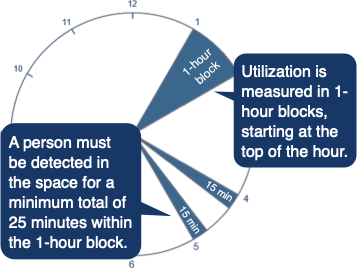
Connect utilization hours are measured in 1-hour blocks, starting at the top of each hour.
- 7–8 am, 1–2 pm, and 4–5 pm are considered for utilization measurement, but not mid-hour times, such as 1:30–2:30 pm.
- For a desk or space to be considered occupied, people must be detected as present in the space for a minimum total of 25 minutes within a one-hour block. The 25 minutes do not have to be consecutive but must be within the same hour.
- If staff were in a room for 20 minutes, that would not be counted as an occupied hour.
- If staff were in a room for 15 minutes at the start of the hour, and 15 minutes at the end of the hour, the total would be counted as an occupied hour.
- When a space qualifies as having been occupied, it counts as one hour, whether it was used for 25 minutes or 55 minutes.